

Apache NiFi for Modern ETL Pipelines: Installation, Configuration & Data Integration Guide
A production-grade guide to building automated dataflow pipelines with Apache NiFi — from architecture internals to real ETL pipelines, performance tuning, and multi-source integration.
Table of Contents
01 Introduction to Apache NiFi
Modern data engineering teams face a relentless volume of data from heterogeneous sources — relational databases, REST APIs, Kafka topics, IoT sensors, cloud storage, and log streams. Stitching these together with shell scripts or custom Python jobs creates brittle, unmaintainable pipelines that lack observability, fault tolerance, and scalability.
Traditional ETL tools were built for batch windows, not the always-on, event-driven reality of today's platforms. They struggle with real-time routing, dynamic schemas, and guaranteed data delivery under pressure. Apache NiFi was purpose-built to solve exactly these problems.
What is Apache NiFi?
Apache NiFi is an open-source, flow-based data integration platform developed by the NSA and donated to the Apache Software Foundation. It provides a visual, drag-and-drop interface for designing dataflows — called FlowFile pipelines — with built-in provenance tracking, backpressure control, and guaranteed delivery semantics.
Why Flow-Based Programming?
Flow-based programming (FBP) treats data as discrete packets flowing through a graph of processing components. Each component has a single responsibility — fetch, transform, route, or deliver — making the system composable, testable, and observable. NiFi's visual canvas makes this paradigm accessible without sacrificing operational depth.
Core Problems NiFi Solves
- Data ingestion at scale — pull from hundreds of sources simultaneously without code changes
- Real-time ETL — process and route streaming data within milliseconds
- Multi-destination fan-out — deliver to Kafka, S3, Elasticsearch, and DB simultaneously
- Data lineage — track every byte from origin to destination with full provenance
02 NiFi Internal Architecture
Understanding NiFi's internal components is essential for designing resilient pipelines. Everything flows through a tightly-integrated system of repositories, controllers, and processors — all coordinated by the NiFi JVM process.
FlowFile
The fundamental data unit in NiFi. Each FlowFile carries a content payload and a map of attributes (key-value metadata). Processors act on FlowFiles as they travel through the pipeline.
Processor
The core processing unit. Each processor performs one task: GetFile, QueryDatabaseTable, ConvertRecord, PutS3Object, etc. Hundreds of built-in processors cover every integration pattern.
Connection
A directed edge between two processors that acts as a queue. It buffers FlowFiles and enforces backpressure when the downstream processor is overwhelmed.
Controller Service
Shared services used by processors — DBCPConnectionPool for database connections, SSLContextService for TLS, SchemaRegistry for Avro/JSON schemas. Configured once, reused everywhere.
Process Group
A logical container for grouping related processors with their connections. Use them to modularize your flow, apply access controls, and manage versioning independently.
Repositories
Three on-disk repositories: FlowFile (tracks active flow metadata), Content (stores FlowFile data), and Provenance (records every data event for auditing and replay).
NiFi Data Flow Architecture
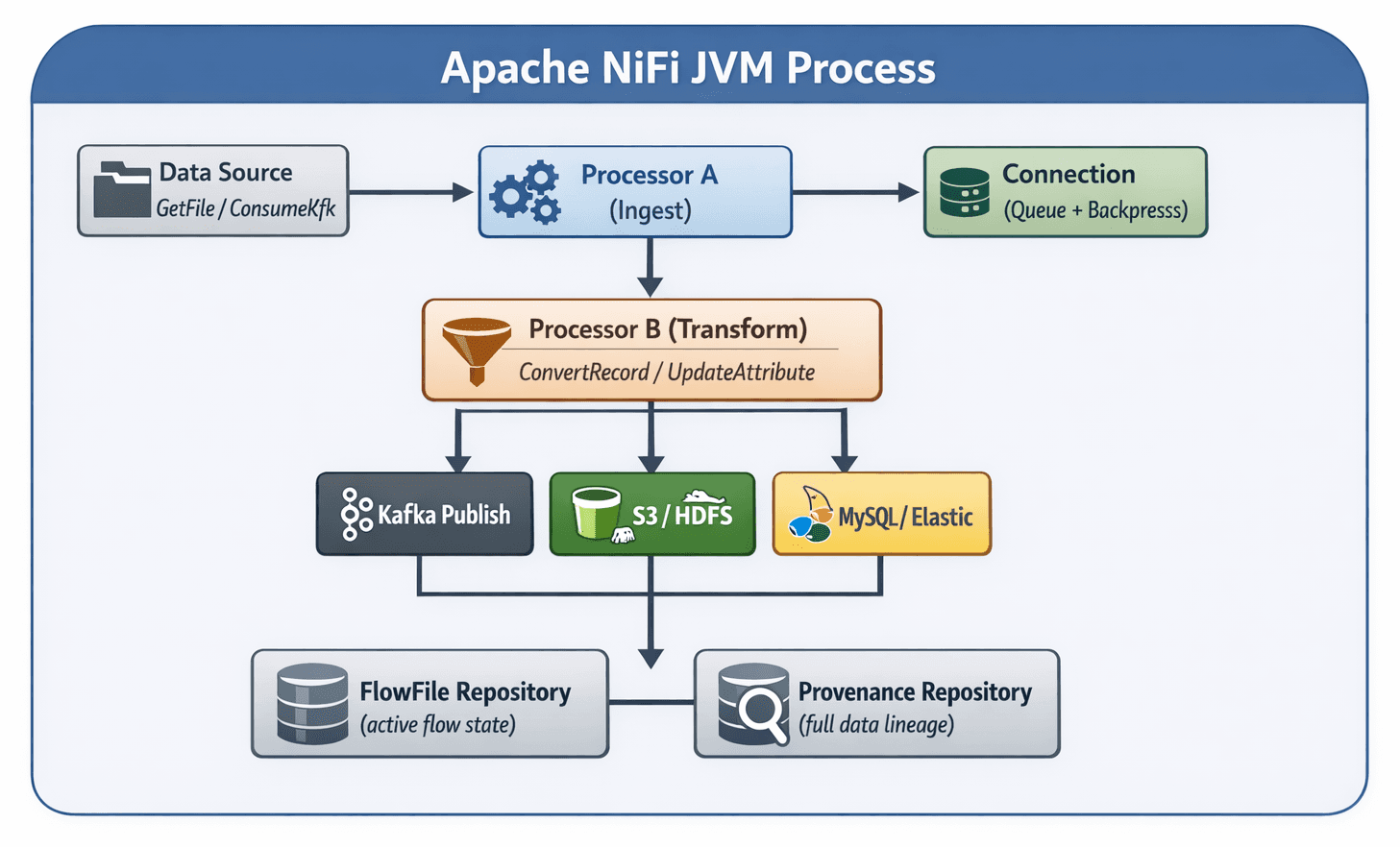
- Backpressure Control: Each Connection queue has configurable object count and data size thresholds. When exceeded, upstream processors pause automatically — protecting downstream systems from overload without data loss.
- Guaranteed Delivery: NiFi writes FlowFile content and metadata to local disk before acknowledging receipt. If the JVM crashes mid-flow, data is recovered and replayed from the repository on restart — zero data loss by design.
- Flow Control: Processors can be scheduled by time (every 10s), CRON expression, or event-driven triggers. Concurrent tasks per processor are tunable to match available CPU and downstream capacity.
03 Key Features of Apache NiFi
Visual Data Flow Designer
The NiFi UI canvas lets you drag, drop, and connect processors visually. No YAML, no code — just a clear, auditable flow graph. Non-engineers can understand and review pipelines at a glance.
Data Provenance Tracking
Every FlowFile event (CREATE, RECEIVE, FETCH, SEND, DROP) is recorded with timestamp, processor, and data snapshot. You can replay any historical data point for debugging or compliance audits.
Backpressure & Prioritization
Fine-grained queue management with object limits, size limits, and expiration policies. Prioritize FlowFiles by oldest, newest, or custom attributes — ensuring critical data is never starved.
Fault Tolerance
All data is persisted to disk before processing. Failed FlowFiles are routed to dedicated 'failure' relationships where they can be retried, quarantined, or redirected — never silently dropped.
Security & Encryption
TLS everywhere: NiFi-to-NiFi, NiFi-to-Kafka, NiFi-to-database. Attribute-level encryption with EncryptContent processor. Role-based access control (RBAC) via LDAP or Apache Ranger integration.
Cluster Support
NiFi scales horizontally from a single node to a 10+ node cluster. A Zero-Leader Cluster model distributes flow execution across all nodes with an embedded Apache ZooKeeper for coordination and state.
04 Installing Apache NiFi (Single Node)
Minimum Recommended Specs
- OS: Ubuntu 22.04 / RHEL 9
- RAM: 8 GB minimum
- CPU: 4+ vCores
- Java: JDK 11 or 21
- Disk: SSD, 100 GB+
- Network: 1 Gbps+
Install Java (JDK 21)
# Ubuntu / Debian
sudo apt update && sudo apt install -y openjdk-21-jdk

# RHEL / Amazon Linux
sudo dnf install -y java-21-amazon-corretto

# Verify
java -version
# openjdk version "21.0.x" ...
Download Apache NiFi
# Download the latest release (check https://nifi.apache.org/download for current version)
export NIFI_VERSION=2.4.0
wget https://downloads.apache.org/nifi/${NIFI_VERSION}/nifi-${NIFI_VERSION}-bin.zip

# Verify SHA-256 checksum
wget https://downloads.apache.org/nifi/${NIFI_VERSION}/nifi-${NIFI_VERSION}-bin.zip.sha256
sha256sum -c nifi-${NIFI_VERSION}-bin.zip.sha256Extract and Position
unzip nifi-${NIFI_VERSION}-bin.zip
sudo mv nifi-${NIFI_VERSION} /opt/nifi
sudo chown -R nifi:nifi /opt/nifi

# Create a dedicated system user (security best practice)
sudo useradd -r -s /sbin/nologin -d /opt/nifi nifiStart NiFi & Verify
# Start NiFi (single-user mode with auto-generated credentials)
sudo -u nifi /opt/nifi/bin/nifi.sh start

# Check startup status (takes 60-90 seconds on first boot)
/opt/nifi/bin/nifi.sh status

# Get auto-generated username and password
grep -i "Generated" /opt/nifi/logs/nifi-app.log

# Access the Web UI
# https://localhost:8443/nifi
Systemd Service (Production)
For production deployments, register NiFi as a systemd service so it auto-starts on reboot and integrates with standard Linux service management. Use /opt/nifi/bin/nifi.sh install to auto-generate the service unit, then sudo systemctl enable nifi && sudo systemctl start nifi.
05 Understanding nifi.properties Configuration
The conf/nifi.properties file is the master configuration for your NiFi instance. It controls web server binding, repository paths, security settings, and cluster membership. Getting this right at deployment time avoids painful migrations later.
Web Server Configuration
# conf/nifi.properties — Web Server
# -----------------------------------------------
# HTTPS (recommended for production)
nifi.web.https.host=0.0.0.0
nifi.web.https.port=8443

# HTTP (development only — disable in production)
nifi.web.http.host=
nifi.web.http.port=

# Proxy Configuration (behind load balancer / Nginx)
nifi.web.proxy.host=nifi.yourdomain.com:443
nifi.web.proxy.context.path=/
Repository Configuration
# conf/nifi.properties — Repositories
# -----------------------------------------------
# FlowFile Repository — tracks active FlowFile lifecycle state
# Recommended: dedicated SSD mount point
nifi.flowfile.repository.directory=/data/nifi/flowfile-repo

# Content Repository — stores actual FlowFile payload data
# Use multiple directories on separate disks for I/O parallelism
nifi.content.repository.directory.default=/data/nifi/content-repo
# Optional additional content directories:
# nifi.content.repository.directory.disk2=/data2/nifi/content-repo

# Provenance Repository — full data lineage audit trail
# This grows large. Set a retention policy.
nifi.provenance.repository.directory.default=/data/nifi/provenance-repo
nifi.provenance.repository.max.storage.time=30 days
nifi.provenance.repository.max.storage.size=10 GB

# Write-Ahead Log (WAL) for FlowFile repository
nifi.flowfile.repository.wal.implementation=org.apache.nifi.wali.SequentialAccessWriteAheadLog
Backpressure & Queue Settings
# conf/nifi.properties — Queue & Backpressure Defaults
# -----------------------------------------------
# Default object count before backpressure kicks in
nifi.queue.backpressure.count=10000

# Default data size before backpressure kicks in
nifi.queue.backpressure.size=1 GB

# These are global defaults; each Connection in the UI can override them
# For high-throughput streaming pipelines, raise count to 100000
# For memory-constrained environments, lower size to 256 MB
Cluster Configuration (Multi-Node)
# conf/nifi.properties — Cluster Settings
# -----------------------------------------------
nifi.cluster.is.node=true
nifi.cluster.node.address=10.0.1.10
nifi.cluster.node.protocol.port=11443

# ZooKeeper connection for cluster coordination
nifi.zookeeper.connect.string=10.0.1.10:2181,10.0.1.11:2181,10.0.1.12:2181
nifi.zookeeper.root.node=/nifi

# Flow Election — wait for a quorum before starting
nifi.cluster.flow.election.max.wait.time=5 mins
nifi.cluster.flow.election.max.candidates=3
Performance Impact: Repositories
Place the FlowFile and Content repositories on separate SSD volumes. The Provenance repository can be on a separate HDD since it's append-only. Separating I/O paths prevents write contention that silently throttles throughput.
JVM Heap Sizing (bootstrap.conf)
# conf/bootstrap.conf
java.arg.2=-Xms4g
java.arg.3=-Xmx8g
# Set Xms = Xmx to avoid GC-related
# heap resizing pauses in production
06 Building Your First ETL Pipeline
Let's build a real-world ETL pipeline that reads customer order records from MySQL, converts them to JSON, enriches with metadata, and indexes them into Elasticsearch for analytics dashboards.
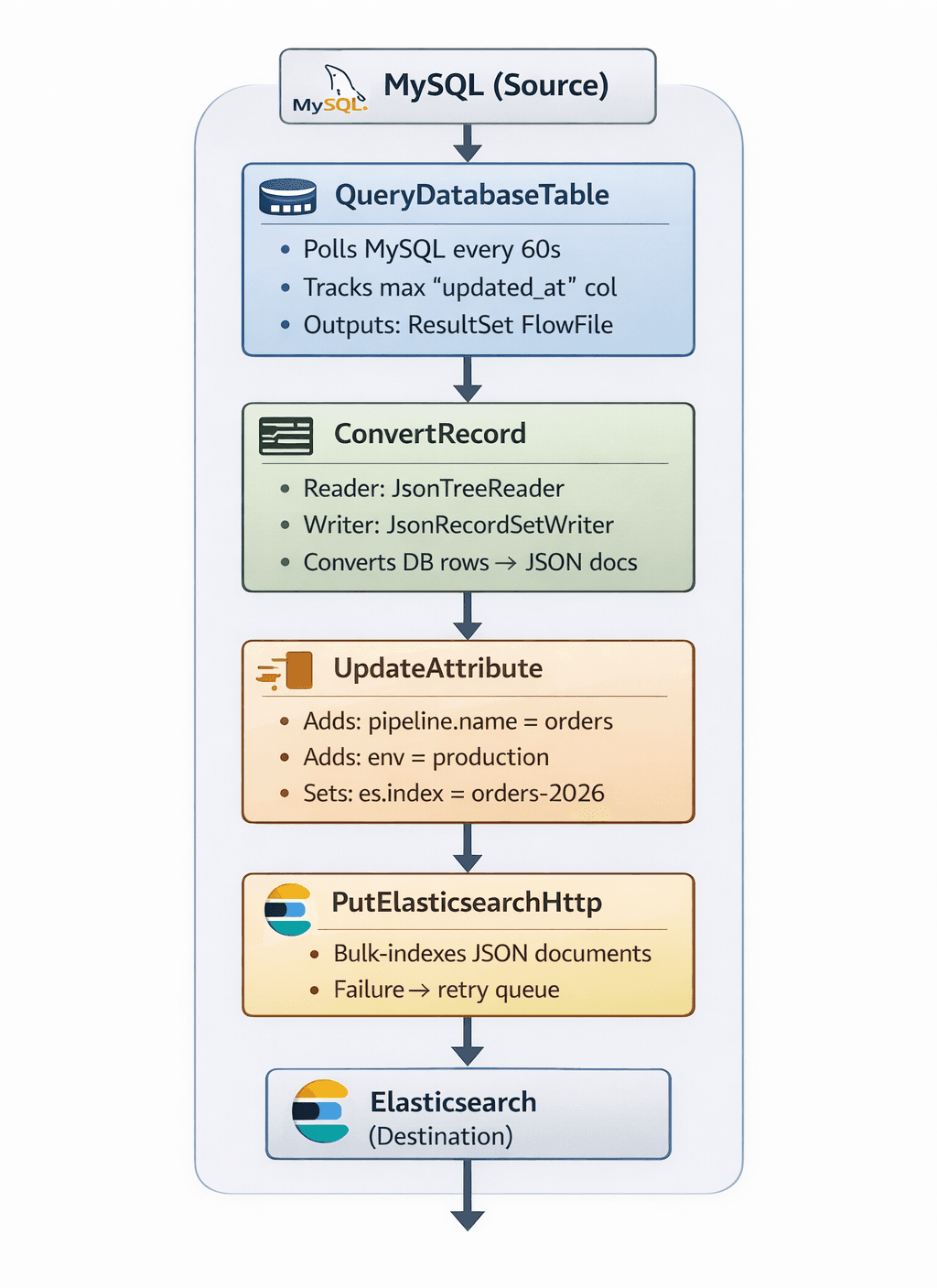
Step-by-Step Processor Configuration
QueryDatabaseTable — Connect to MySQL
# Controller Service: DBCPConnectionPool
Database Connection URL:  jdbc:mysql://10.0.1.10:3306/ecommerce
Database Driver Class:    com.mysql.cj.jdbc.Driver
Database User:            nifi_reader
Password:                 <encrypted>

# Processor Properties
Table Name:               orders
Maximum-value Columns:    updated_at
Fetch Size:               5000
Max Rows Per Flow File:   1000
ConvertRecord — Transform ResultSet to JSON
# Processor Properties
Record Reader:  JsonTreeReader
Record Writer:  JsonRecordSetWriter
               (Output: array of JSON objects)

# Schema Registry (optional but recommended)
# Define your order schema in Avro to enforce types:
{
"type": "record", "name": "Order",
"fields": [
{"name": "order_id", "type": "long"},
{"name": "customer", "type": "string"},
{"name": "amount", "type": "double"},
{"name": "status", "type": "string"},
{"name": "updated_at","type": {"type": "long", "logicalType": "timestamp-millis"}}
]
}UpdateAttribute — Enrich FlowFile Metadata
# NiFi Expression Language attribute enrichment
es.index         = orders-${now():format('yyyy-MM')}
pipeline.version = 1.0
source.table     = orders
ingest.timestamp = ${now():toNumber()}PutElasticsearchHttp — Index to Elasticsearch
# Processor Properties
Elasticsearch URL:    http://es-cluster:9200
Index:                ${es.index}
Document Type:        _doc
Index Operation:      index
Batch Size:           100
Connection Timeout:   5 secs

# Relationships
success  → LogAttribute (for audit)
failure  → PutFile (/data/nifi/failed-orders) → retry loop
07 Data Source Integration
NiFi's processor library covers virtually every source a modern data platform needs. Below are the most common integration patterns with their key processors and configuration notes.
Relational Databases (MySQL, PostgreSQL, Oracle)
QueryDatabaseTableIncremental polling. Tracks a high-watermark column (e.g., updated_at or id) so only new/changed rows are fetched on each run. Ideal for slow-moving tables.GenerateTableFetchGenerates SQL queries for parallel partition fetching. Combined with ExecuteSQL and partition strategies, handles tables with billions of rows efficiently across concurrent tasks.ExecuteSQLExecutes arbitrary SQL — JOINs, aggregations, stored procedures. Best for complex transformations that are more naturally expressed in SQL than as NiFi processor chains.
# PostgreSQL Connection (DBCPConnectionPool Controller Service)
Database Connection URL:  jdbc:postgresql://pg-primary:5432/analytics
Database Driver:          org.postgresql.Driver
Database User:            nifi_ro
Max Total Connections:    20
Min Idle Connections:     5
Validation Query:         SELECT 1
Streaming Sources (Kafka, REST APIs, Cloud Storage)
ConsumeKafkaConsumes from one or more Kafka topics with at-least-once delivery. Configurable consumer group, auto-commit control, and max poll records. Supports SASL/SSL, schema registry integration.ListenHTTPSpins up an embedded HTTP/HTTPS server to receive webhook payloads, API callbacks, or log shipper data. Supports authentication and SSL termination.GetFile / ListFileMonitors a local filesystem path or SFTP/FTP remote for new files. ListFile + FetchFile pattern gives more control over large directory trees.GetS3Object / ListS3Pulls objects from S3 (or S3-compatible storage like MinIO). ListS3 generates listings, FetchS3Object retrieves content — enabling parallel, resumable ingestion.
# Kafka Consumer (ConsumeKafka)
Kafka Brokers:         kafka1:9092,kafka2:9092
Topic Name(s):         orders.events
Group ID:              nifi-orders-consumer
Offset Reset:          latest
Message Demarcator:    (empty → one FF per message)
Max Poll Records:      500
Honor Transactions:    true

# Kafka + Schema Registry
Schema Registry URL:   http://schema-registry:8081
Schema Access:         HWX Schema Reference
Key Deserializer:      String
Value Deserializer:    Avro
08 Output Channels & Destinations
One of NiFi's greatest strengths is its ability to fan out to multiple destinations from a single pipeline. Data can be delivered to a data lake, indexed in Elasticsearch, and published back to Kafka — all in parallel, from one flow.
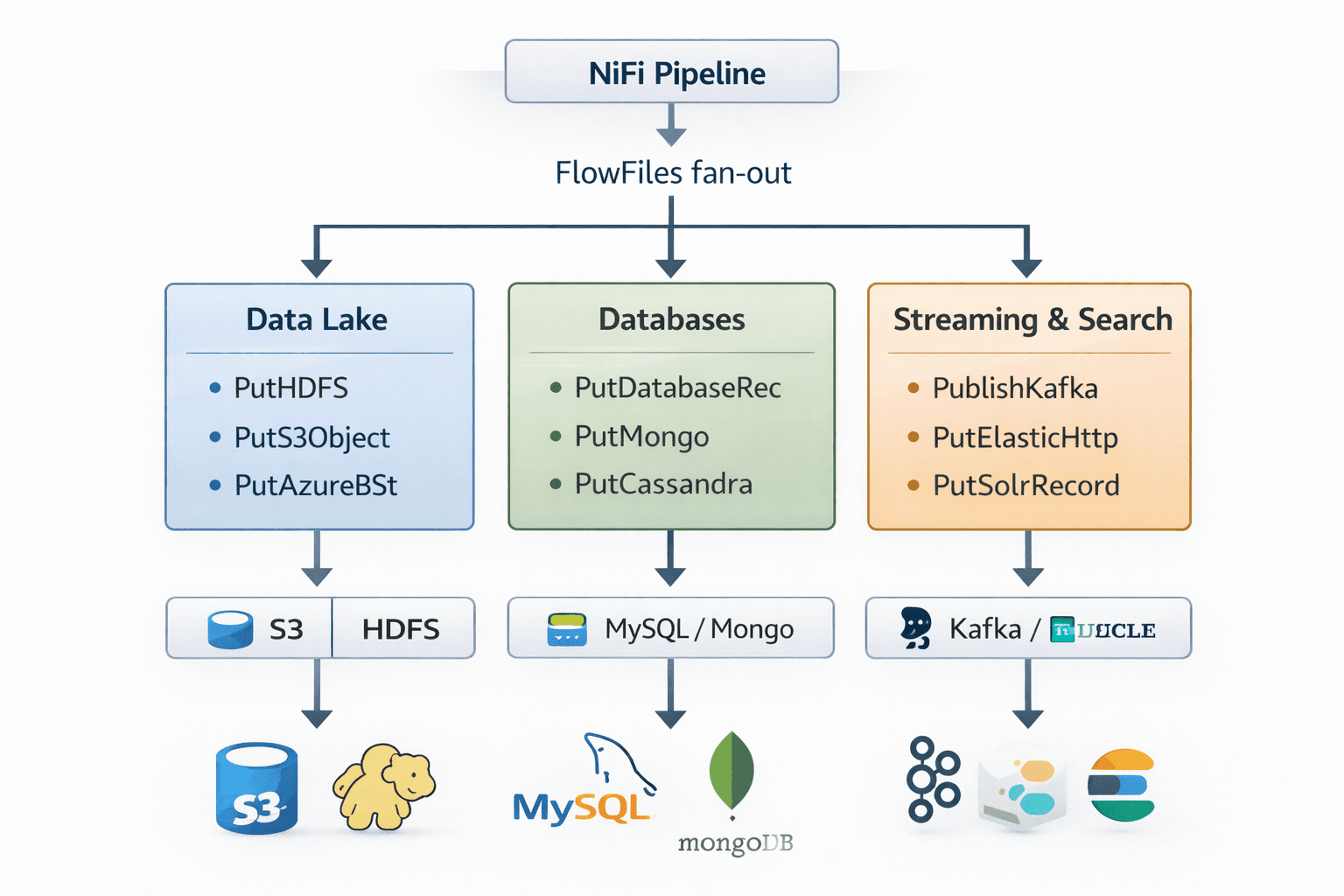
PutS3Object / PutHDFS
Data Lake# PutS3Object
Bucket: raw-data-lake
Key Expression: ${source.table}/${now():format('yyyy/MM/dd')}/${uuid()}.json
Region: us-east-1
Storage Class: STANDARD_IA
Server-side Encryption: AES256PutDatabaseRecord
Relational DB# PutDatabaseRecord (PostgreSQL sink)
Record Reader: JsonTreeReader
Statement Type: INSERT (or UPSERT)
Table Name: ${target.table}
Translate Fields: true
Quote Column IDs: false
Max Batch Size: 500PublishKafkaRecord
Kafka Sink# PublishKafkaRecord
Kafka Brokers: kafka1:9092,kafka2:9092
Topic Name: ${kafka.output.topic}
Record Reader: JsonTreeReader
Record Writer: AvroRecordSetWriter
Compression Type: SNAPPY
Delivery Guarantee: REPLICATEDPutMongo
MongoDB# PutMongo
Mongo URI: mongodb://mongo1:27017,mongo2:27017
Database: analytics
Collection: ${mongo.collection}
Update Mode: Insert
Write Concern: MAJORITY09 NiFi in Modern Data Platform Architecture
NiFi seldom operates in isolation. In production analytics platforms, it serves as the universal data mover — the connective tissue between raw sources and the analytical layer. Here's where it fits in a Lambda/Kappa-style architecture:
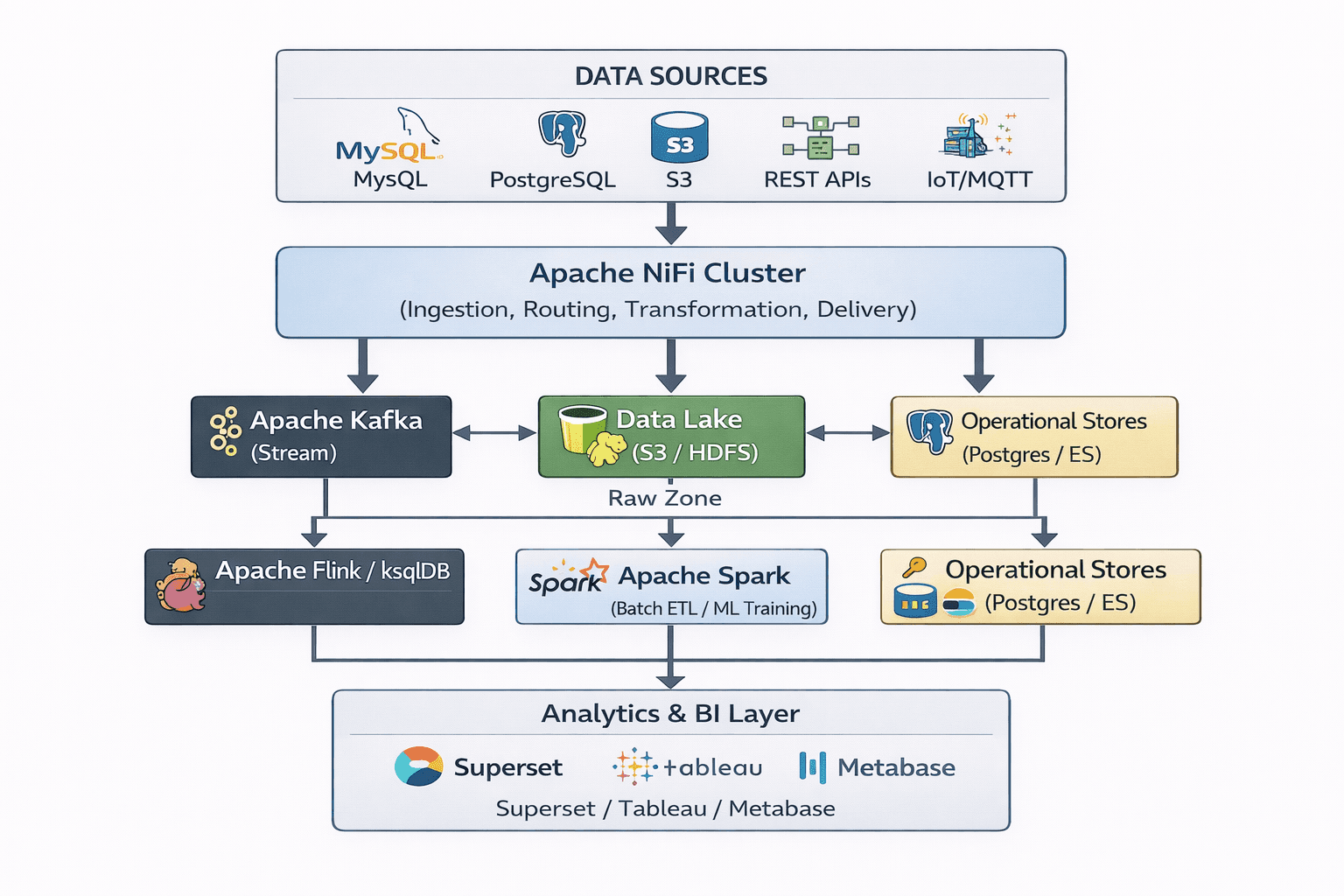
- NiFi + Kafka: NiFi ingests from databases and APIs, publishes to Kafka topics, providing durable buffering. Kafka consumers (Flink, Spark Streaming, ksqlDB) then derive real-time materialized views and alerts.
- NiFi + Spark: NiFi lands raw data in the Data Lake (Parquet on S3). Spark batch jobs run nightly transformations, creating curated/enriched datasets. NiFi can trigger Spark jobs via ExecuteScript or invoke the Livy REST API.
- NiFi + Data Lakes: NiFi writes to partitioned S3/HDFS paths using expression language templates. It handles format conversion (CSV → Parquet), schema evolution, and compaction — reducing Spark job complexity significantly.
10 Performance Tuning & Production Best Practices
JVM & Memory Tuning
# conf/bootstrap.conf
# Set heap to 50-70% of node RAM
java.arg.2=-Xms8g
java.arg.3=-Xmx8g

# G1GC is recommended for NiFi 1.x
java.arg.13=-XX:+UseG1GC
java.arg.14=-XX:MaxGCPauseMillis=100

# For NiFi 2.x with JDK 21+
java.arg.13=-XX:+UseZGC
# ZGC delivers sub-millisecond GC pauses
# critical for real-time streaming pipelines
Processor Scheduling
# Per-Processor Scheduling (via UI)
Scheduling Strategy:   Timer Driven
Run Schedule:          0 sec  (runs constantly)
  or CRON expression:  0 0/5 * * * ?  (every 5 min)
Concurrent Tasks:      4     (match CPU cores)

# For high-throughput sources:
# Increase Concurrent Tasks to saturate I/O
# ConsumeKafka: 4-8 concurrent tasks
# PutS3Object:  2-4 (avoid S3 rate limiting)
# QueryDatabase: 1  (prevent DB overload)
Monitoring Metrics
- FlowFiles Queued:⚠ > 50k = backpressure risk→ Increase downstream concurrency or add processors
- Bytes Read/Written:⚠ Sudden drop = source failure→ Check processor logs and error relationships
- Active Threads:⚠ = Max → processor starved→ Increase JVM thread pool (nifi.properties)
- GC Duration:⚠ > 100ms = heap pressure→ Increase Xmx or reduce content repo objects
- Provenance Events/s:⚠ Drops > 20% = disk I/O issue→ Move provenance repo to faster disk
- 5-min Bulletin:⚠ Any ERROR bulletins→ Check Bulletin Board in NiFi UI for root cause
# Expose NiFi metrics to Prometheus (nifi.properties)
nifi.metrics.exporter.implementation=org.apache.nifi.reporting.prometheus.PrometheusReportingTask

# Or use the built-in Grafana dashboard:
# https://grafana.com/grafana/dashboards/12398  (NiFi Operations Dashboard)
# Scrape interval: 15s, expose /metrics endpoint on port 9092
Production Deployment Checklist
11 When to Use Apache NiFi
NiFi is a powerful general-purpose data mover, but like any tool it has a natural fit. Use it where it excels — and be aware of the trade-offs for certain use cases.
Best Fit Use Cases
- Database CDC & Replication
Polling or CDC from relational sources into Kafka or a data lake. NiFi's incremental watermark tracking makes this reliable.
- Multi-Source Data Ingestion
Pulling from 20+ heterogeneous sources (APIs, files, DBs) into a unified landing zone without writing integration code.
- IoT Data Ingestion
Receiving MQTT / HTTP streams from IoT devices, normalizing, enriching with device metadata, and routing to HDFS + InfluxDB.
- Log & Event Processing
Collecting logs from servers via ListenSyslog or GetFile, parsing with ExtractText or LogAttribute, forwarding to Elasticsearch.
- ETL Orchestration
Complex multi-step flows with conditional routing, retry logic, schema conversion, and fan-out delivery — all visual and auditable.
Consider Alternatives When...
- Sub-millisecond latency needed
For ultra-low latency stream processing (complex event processing), Apache Flink or Kafka Streams are better choices. NiFi's per-FlowFile overhead adds ~1–10ms.
- Heavy stateful aggregations
Windowed aggregations, joins across streams, and stateful computations are better handled by Flink or ksqlDB, which have native state stores.
- Pure batch job dependencies
If your ETL is purely batch with DAG dependencies, dbt + Airflow is a more natural and testable fit than NiFi flow sequences.
- Team with no DataFlow expertise
NiFi has a learning curve. If the team is Python-native, tools like Airbyte or dlt may be faster to adopt for standard connector-based pipelines.
12 Conclusion
Apache NiFi has earned its place in the modern data engineering stack. It solves the right problems — data ingestion at scale, fault-tolerant routing, visual auditability, and guaranteed delivery — without requiring you to write and maintain thousands of lines of custom integration code.
For platform engineers, NiFi's operational profile is excellent: clear metrics, bulletin boards for errors, provenance for debugging, and systemd integration for host-level management. For data engineers, the visual canvas translates complex routing logic into reviewable, version-controlled flow definitions. Both audiences can collaborate on the same artifact.
Explore NiFi Clustering
A 3-node NiFi cluster with embedded ZooKeeper provides horizontal scale and high availability. Load-balanced connections distribute FlowFiles automatically — no manual partitioning required.
Harden Security
Add LDAP/OIDC user authentication, enable TLS end-to-end, integrate with Apache Ranger for policy-based access control, and use NiFi's built-in sensitive property encryption.
Adopt NiFi Registry
NiFi Registry with a Git provider backend enables Git-based flow version control, environment promotion workflows (dev → staging → prod), and CI/CD pipeline integration for DataOps teams.