Kafka Connect Deep Dive: Source & Sink Connectors
Operationalizing Enterprise Data Integration at Scale
1. Kafka Connect Overview
In enterprise data systems, moving data is rarely about just the transport—it's about reliability, scalability, and observability. Kafka Connect is the industry-standard framework for bridging the gap between Apache Kafka and external datastores. Instead of writing custom, brittle "plumbing" code, Connect provides a declarative, distributed environment that handles the heavy lifting: offset management, task rebalancing, and fault tolerance at scale.
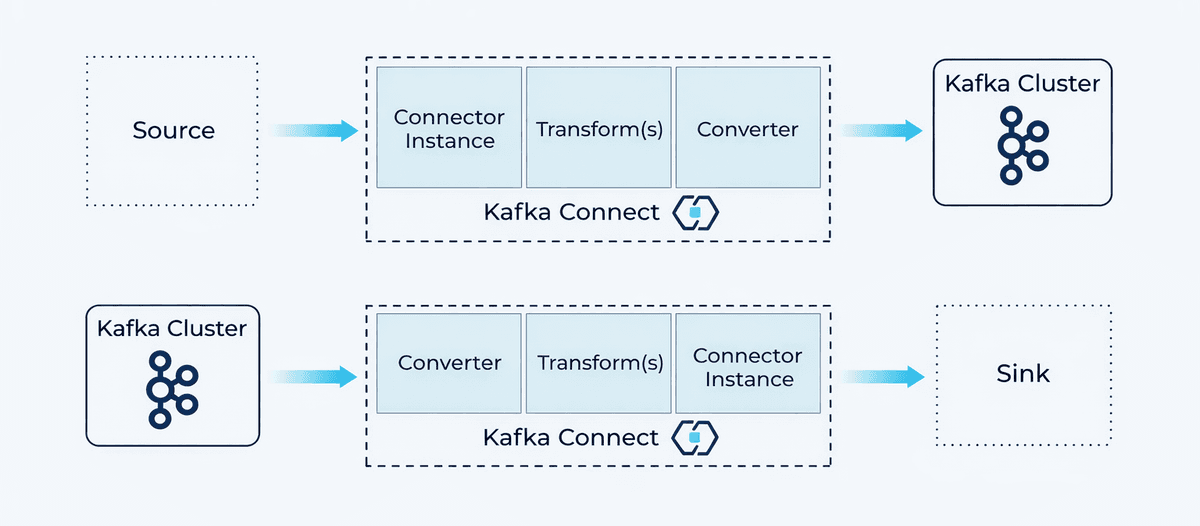
Kafka Connect Internal Architecture
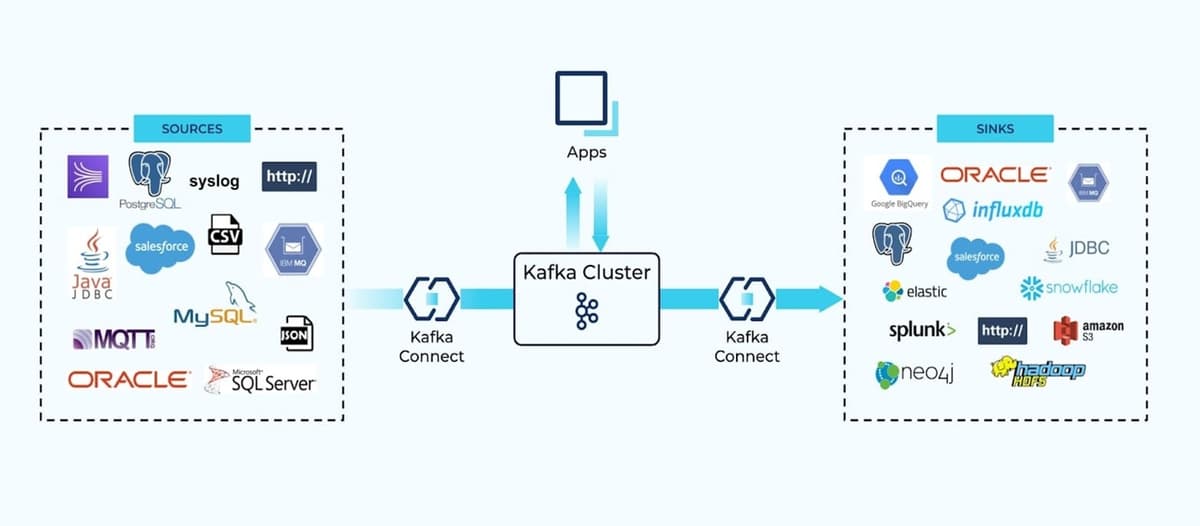
Source & Sink Data Flow
Efficiency
Zero Code: Declarative JSON over custom SDKs.
Scale
Auto-Scaling: Automated task distribution across workers.
Safety
Resilience: Dead-letter queues & exactly-once semantics.
2. Internal Architecture & Elasticity
Kafka Connect is more than a simple data pipeline—it is a self-healing, distributed runtime. By leveraging the Kafka consumer protocol, it coordinates work distribution across a cluster of "Workers," ensuring that addition or removal of a node triggers an automatic redistribution of tasks.
The Holy Trinity of State
In Distributed Mode, Kafka Connect stores its state in three compacted internal Kafka topics. These topics are the source of truth for the cluster and must be configured with a high replication factor (3+).
Config
Stores declarative connector configurations and lineage.
Offsets
Tracks read positions for Sources and committed partitions for Sinks.
Status
Maintains health and lifecycle states of all Workers and Tasks.
Serialization & In-Flight Processing
To transform raw bytes into meaningful events, Kafka Connect uses a pluggable processing layer. Converters (Avro, Protobuf, JSON) handle the serialization, while Single Message Transformations (SMT) enable lightweight, stateless processing—like PII masking or field renaming—directly at the edge.
3. Source Connectors Deep Dive
Source integration patterns fall into two categories: Polling (query-based) and Log-based (CDC). While polling is easy to implement, it often misses deletes and puts pressure on the source DB. CDC is the gold standard for high-fidelity data capture.
Database CDC to Kafka
A) MongoDB Source (Change Streams)
Captures change events directly from MongoDB's oplog/change-streams.
// mongodb-source.json
{
  "name": "mongo-source-orders",
  "config": {
    "connector.class": "com.mongodb.kafka.connect.MongoSourceConnector",
    "connection.uri": "mongodb://mongo:27017",
    "database": "sales",
    "collection": "orders",
    "topic.prefix": "mongo",
    "pipeline": "[{'$match': {'operationType': {'$in': ['insert', 'update']}}}]",
    "publish.full.document.only": "true",
    "tasks.max": "3"
  }
}
B) JDBC Source (Query-based)
Uses SQL queries to poll for changes. Best for legacy systems where log access is restricted.
// jdbc-source-users.json
{
  "name": "jdbc-source-users",
  "config": {
    "connector.class": "io.confluent.connect.jdbc.JdbcSourceConnector",
    "connection.url": "jdbc:postgresql://db:5432/userdb",
    "mode": "timestamp+incrementing",
    "incrementing.column.name": "id",
    "timestamp.column.name": "updated_at",
    "topic.prefix": "users.events",
    "poll.interval.ms": "5000"
  }
}
4. Sink Connectors Deep Dive
Sink ingestion requires careful handling of delivery guarantees. While "at-least-once" is the default, writing to downstream systems can lead to duplicates unless idempotency is baked into the write logic (e.g., using primary keys for upserts).
Kafka to Cache Sync
A) MongoDB Sink (Upsert Semantic)
// mongodb-sink.json
{
  "name": "mongo-sink-summary",
  "config": {
    "connector.class": "com.mongodb.kafka.connect.MongoSinkConnector",
    "connection.uri": "mongodb://mongo:27017",
    "database": "analytics",
    "collection": "order_summary",
    "topics": "orders.events",
    "writemodel.strategy": "com.mongodb.kafka.connect.sink.writemodel.strategy.ReplaceOneBusinessKeyStrategy",
    "document.id.strategy": "com.mongodb.kafka.connect.sink.processor.id.strategy.PartialValueStrategy",
    "document.id.strategy.partial.value.projection.list": "order_id",
    "errors.tolerance": "all",
    "errors.deadletterqueue.topic.name": "orders.events.dlq"
  }
}
B) Redis Sink (Hash Ingestion)
// redis-sink-sessions.json
{
  "name": "redis-sink-sessions",
  "config": {
    "connector.class": "com.github.jcustenborder.kafka.connect.redis.RedisSinkConnector",
    "redis.hosts": "redis:6379",
    "topics": "session.events",
    "redis.command": "HMSET",
    "redis.key": "session:${value.session_id}",
    "ttl.seconds": "3600"
  }
}
5. Multi-Sink & Fan-Out Architecture
A single Kafka topic, such as orders.events, can be consumed by multiple connectors simultaneously. Each sink operates independently, maintaining its own consumer group and offsets.
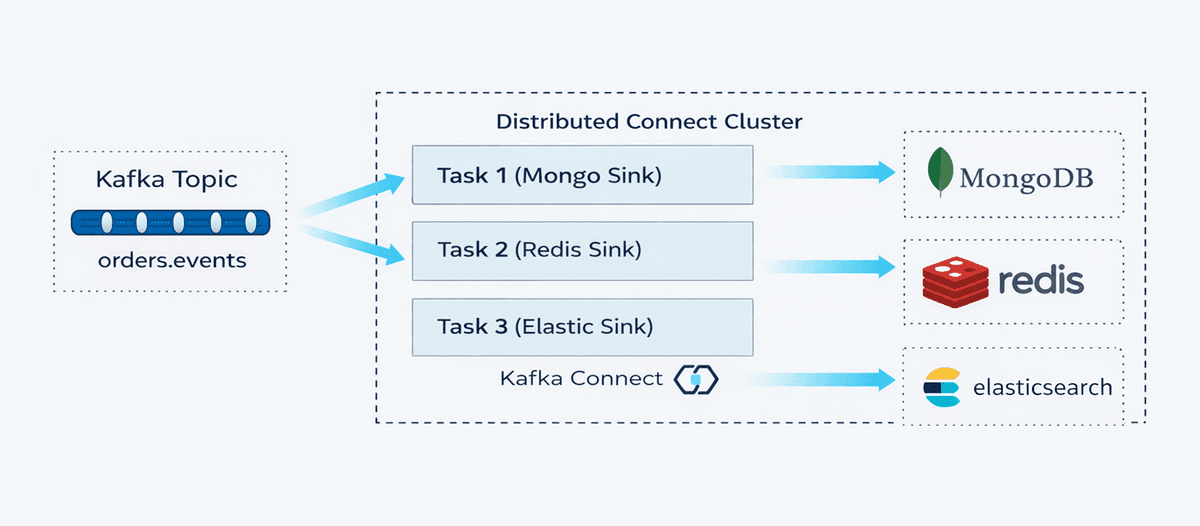
Kafka Connect Fan-out Pattern
6. Production Considerations
Scaling via Tasks.max
For sinks, tasks.max should align with the partition count of the input topic. Setting tasks.max higher than partitions results in idle tasks.
Error Tolerance & DLQ
errors.tolerance = all
errors.deadletterqueue.topic.name = connect-dlq
errors.deadletterqueue.context.headers.enable = true
errors.retry.delay.max.ms = 60000
errors.retry.timeout = 300000
Monitoring via JMX
Critical metrics to alert on:
- kafka.connect:type=connector-task-metrics,connector=*,task=* -> status (FAILED)
- kafka.connect:type=sink-task-metrics,connector=*,task=* -> offset-commit-failure-percentage
- kafka.connect:type=source-task-metrics,connector=*,task=* -> source-record-poll-rate
7. When NOT to Use Kafka Connect
While Kafka Connect is powerful, it is not a panacea.
Avoid if:
- Complex Logic: You need to join multiple streams or perform heavy stateful aggregations (Use Kafka Streams instead).
- Batch Only: You only need to move data once a day (Use Airflow/Snowflake).
- Ultra-low Latency: Custom protocol handling where overhead of Connect framework is too high.
Prefer if:
- Standard Integration: Moving data to/from SQL, Mongo, S3, ES.
- Reliability: You need managed offset commits and fault tolerance out of the box.
- No Code: You prefer declarative YAML/JSON configuration over managing SDK upgrades in custom apps.
8. Conclusion
Kafka Connect is the architectural backbone for the modern, event-driven data platform. By offloading the operational complexity of offset management and distributed scaling to the framework, platform engineers can focus on the Schema and Semantics of data rather than the plumbing of its delivery. Correct configuration of Distributed Mode and robust Monitoring via JMX are the final mile hurdles to a production-grade deployment.
Build a Sandbox
Ready to experiment? Check my related post on Kafka KRaft Clustering to set up a Zookeeper-less environment for these connectors.
View KRaft Setup Guide