

MySQL Production Replica Set: HA with Group Replication
A complete step-by-step guide for setting up a 3-node HA cluster with automatic failover, OS hardening, and production-grade tuning on Amazon Linux 2023 ARM64.
Table of Contents
01 Architecture Checklist
Imagine your database is a single point of truth. If that one server goes down, your entire business stops. To prevent this "single point of failure," we use a 3-node cluster. Think of it as having three dedicated employees doing the same job at the same time.
What is a 3-Node Setup?
It's like having a backup team. One member is the Leader (Primary) who handles the changes, while the other two are Assistants (Replicas) who keep an exact copy of the data. If the Leader gets sick, the Assistants immediately vote for a new Leader. Work never stops!
What is Group Replication?
Think of it as a "Democratic Voting System" for your data. Instead of trusting one server blindly, every piece of information must be approved by the majority of the group before it's saved. This ensures no data is lost even during a sudden crash.
How it Works (The Visual Flow)
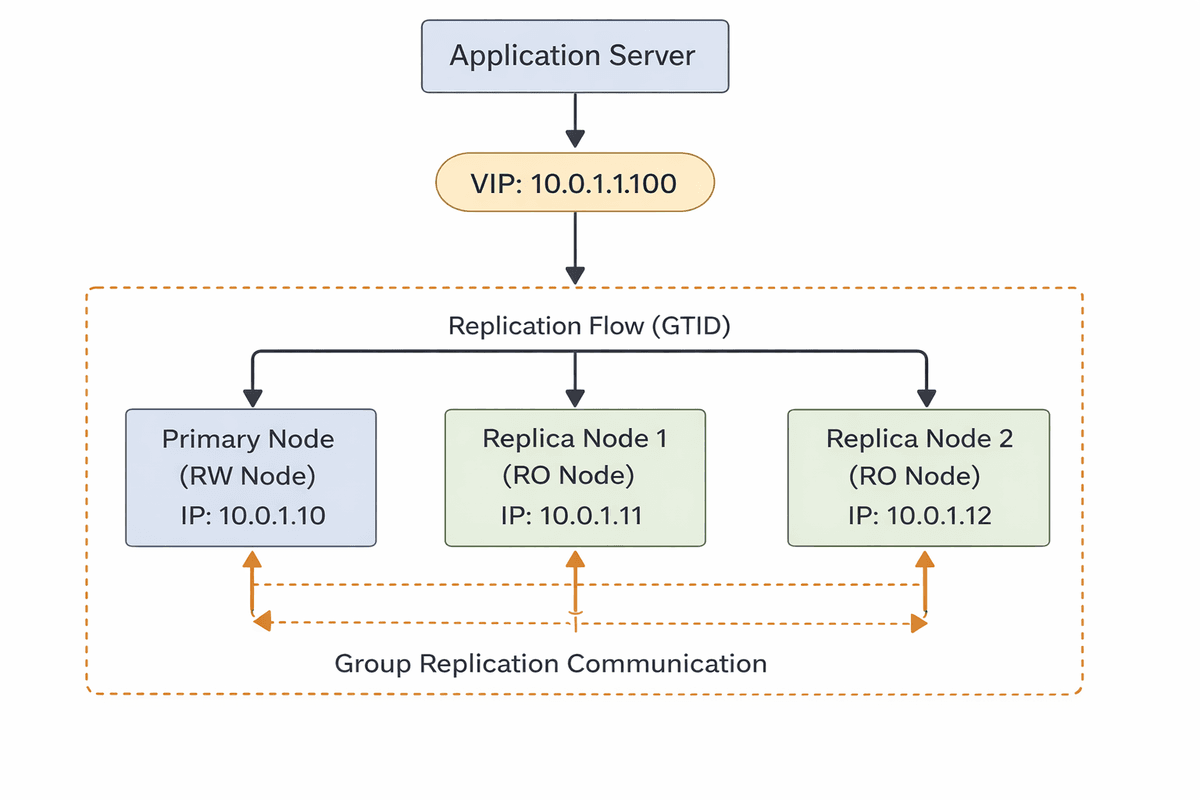
Top 3 Advantages
- 1. Zero Downtime
Users won't even notice if a server fails. The system heals itself in seconds.
- 2. Data Integrity
The "consensus" system guarantees that what you save on one is exactly what you get on others.
- 3. Automatic Setup
Modern Group Replication handles the messy coordination scripts so you don't have to.
02 OS & Hardware Setup
Minimum Recommended Specs
- RAM: 8GB+ (75% for Buffer Pool)
- CPU: 2+ vCPUs (ARM64/Graviton)
- Disk: SSD/gp3 with XFS FS
Amazon Linux 2023 is lean, but for a database server, we must disable Transparent Huge Pages (THP) and optimize the TCP stack to handle replication traffic efficiently.
1. Disable THP & Update Limits
# Permanently disable THP on AL2023
echo 'transparent_hugepage=never' | sudo tee /etc/default/grub.d/thp.cfg
sudo grub2-mkconfig -o /boot/grub2/grub.cfg

# Set soft/hard limits for MySQL user
cat <<EOF | sudo tee /etc/security/limits.d/mysql.conf
mysql soft nofile 1048576
mysql hard nofile 1048576
mysql soft nproc 65535
mysql hard nproc 65535
EOF
2. Kernel Optimization (sysctl)
cat <<EOF | sudo tee /etc/sysctl.d/99-mysql.conf
# Database specific tuning
vm.swappiness = 1
vm.dirty_ratio = 15
vm.dirty_background_ratio = 5
fs.file-max = 2097152

# Network tuning for replication
net.core.somaxconn = 65535
net.ipv4.tcp_max_syn_backlog = 8192
net.ipv4.ip_local_port_range = 1024 65535
net.ipv4.tcp_tw_reuse = 1
net.ipv4.tcp_fin_timeout = 30
net.core.rmem_max = 16777216
net.core.wmem_max = 16777216
EOF

sudo sysctl --system
03 MySQL Installation
We install the official Oracle MySQL community repository to ensure we have the latest 8.0.x features and security patches. These steps should be executed on all three nodes.
Add Yum Repository
# Download and install the EL9 repository package
sudo dnf install -y https://dev.mysql.com/get/mysql80-community-release-el9-1.noarch.rpm

# Verify the repository is active
sudo dnf repolist | grep mysql
Install MySQL Server
# Disable default AL2023 mysql modules to prevent conflicts
sudo dnf -y module disable mysql

# Install the community server
sudo dnf install -y mysql-community-server
Initialize & Start Service
sudo systemctl start mysqld
sudo systemctl enable mysqld
Verification
Retrieve your temporary root password:
sudo grep 'temporary password' /var/log/mysqld.logSecure the Installation
sudo mysql_secure_installationProvide the temporary password from the previous step. We recommend:
• Set a strong root password
• Remove anonymous users
• Disallow remote root login
04 Optimized my.cnf Setup (All Nodes)
The configuration file (/etc/my.cnf or /etc/my.cnf.d/mysql-server.cnf) is the heart of your database performance. Below is a production-hardened template optimized for 8GB RAM instances.
Recommended /etc/my.cnf
[mysqld]
# --- Network & Basic ---
server-id                       = 1             # Unique ID (1, 2, or 3)
bind-address                    = 0.0.0.0       # Listen on all interfaces
port                            = 3306

# --- GTID & Replication (Mandatory for HA) ---
gtid_mode                       = ON            # Global Transaction ID
enforce_gtid_consistency        = ON            # Prevent non-GTID safe statements
log_bin                         = /var/log/mysql/mysql-bin.log
binlog_format                   = ROW           # ROW is required for GR
binlog_checksum                 = NONE          # Faster, GR handles its own
log_slave_updates               = ON            # Replicas must log updates
expire_logs_days                = 7             # Auto-purge old binlogs

# --- InnoDB Performance (Tuned for 8GB RAM) ---
innodb_buffer_pool_size         = 6G            # 75% of total RAM
innodb_log_file_size            = 1G            # Large logs = better write speed
innodb_flush_log_at_trx_commit  = 1             # 1 = Full ACID compliance
innodb_flush_method             = O_DIRECT      # Bypass OS cache (avoid double buffering)
innodb_io_capacity              = 2000          # Match EBS gp3 IOPS
innodb_file_per_table           = 1

# --- Connections & Security ---
max_connections                 = 2000
max_allowed_packet              = 64M
disabled_storage_engines        = "MyISAM,BLACKHOLE"
transaction_write_set_extraction = XXHASH64     # Required for Group Replication
Why O_DIRECT?
Using O_DIRECT ensures that MySQL talks directly to the disk, preventing the Linux kernel from wasting RAM by caching data that is already cached in the innodb_buffer_pool. This is vital for 8GB instances.
ACID Compliance (trx_commit=1)
In production, never set this to 0 or 2 unless you can afford losing 1 second of data during a crash. Setting it to 1 ensures that every transaction is flushed to disk.
Role Specific Overrides
# ON PRIMARY (Node 1)
read_only = OFF
super_read_only = OFF
# ON REPLICAS (Node 2 & 3)
read_only = ON
super_read_only = ON
# Enforces data integrity
05 Replication Setup (GTID)
Before enabling the advanced Group Replication, we must sync the baseline data using standard GTID-based asynchronous replication. GTID (Global Transaction Identifier) makes replication management seamless by eliminating the need to track binlog files and offsets manually.
1. Create Replication User (On Primary)
-- Open MySQL shell on Node 1 (Primary)
CREATE USER 'repl_user'@'%' IDENTIFIED WITH mysql_native_password BY 'ReplSecurePass123!';
GRANT REPLICATION SLAVE, REPLICATION CLIENT ON *.* TO 'repl_user'@'%';
FLUSH PRIVILEGES;
2. Consistent Snapshot (On Primary)
We use mysqldump with --set-gtid-purged=ON to capture the current GTID set along with the data.
# Capture all databases without locking
mysqldump --all-databases --single-transaction --triggers --routines --events --set-gtid-purged=ON -u root -p > prod_backup.sql

# Transfer the dump to Node 2 and Node 3
scp prod_backup.sql ec2-user@10.0.1.11:/tmp/
3. Start Replication (On Replicas)
-- On Node 2 and 3
mysql -u root -p < /tmp/prod_backup.sql

CHANGE REPLICATION SOURCE TO
  SOURCE_HOST='10.0.1.10',
  SOURCE_USER='repl_user',
  SOURCE_PASSWORD='ReplSecurePass123!',
  SOURCE_AUTO_POSITION=1;

START REPLICA;
Health Check
Run this to ensure `Replica_IO_Running` and `Replica_SQL_Running` are both **Yes**:
SHOW REPLICA STATUS\G
Pro-Tip: Transferring Large Dumps
For datasets > 50GB, standard scp can be slow. Use rsync -P or pipe the dump directly over SSH to avoid intermediate disk space issues:
mysqldump ... | ssh node2 "mysql -u root -p"
06 Group Replication (HA Core)
Now we transition from traditional replication to the HA Core. Group Replication ensures that all nodes coordinate using a consensus protocol. If the Primary fails, the group automatically elects a new one.
Add to my.cnf (All Nodes)
plugin_load_add                           = group_replication.so
group_replication_group_name              = "aaaaaaaa-bbbb-cccc-dddd-eeeeeeeeeeee"
group_replication_start_on_boot           = OFF
group_replication_local_address           = "10.0.1.10:33061"
group_replication_group_seeds             = "10.0.1.10:33061,10.0.1.11:33061,10.0.1.12:33061"
group_replication_bootstrap_group         = OFF
group_replication_single_primary_mode     = ON
group_replication_enforce_update_everywhere_checks = OFF
Technical Note: Why Port 33061?
GCS (Group Communication System) Traffic
Unlike port 3306 (SQL traffic), port 33061 is used exclusively for internal node-to-node coordination (Consensus/Paxos). It handles heartbeats and data consistency voting. Security Tip: Close this port to the outside world—it should only be accessible by other cluster members.
Step 6.1: Bootstrap the Group (Node 1 Only)
SET GLOBAL group_replication_bootstrap_group=ON;
START GROUP_REPLICATION;
SET GLOBAL group_replication_bootstrap_group=OFF;
Step 6.2: Join the Group (Node 2 & 3)
START GROUP_REPLICATION;
Monitoring Membership
Check who is in the group and their health status:
SELECT MEMBER_HOST, MEMBER_PORT, MEMBER_STATE, MEMBER_ROLE
FROM performance_schema.replication_group_members;
ONLINE
Healthy node
RECOVERING
Syncing data
UNREACHABLE
Network issue
ERROR
Internal failure
07 Virtual IP with Keepalived
To allow your application to always find the Primary (Read-Write) node without hardcoding individual server IPs, we use a Virtual IP (VIP) managed by Keepalived.
What is a Virtual IP?
Think of a VIP as a "Floating Phone Number" for your database. You don't call the worker directly; you call the office number. In a failover, Keepalived automatically moves this VIP from the old Primary to the new one in milliseconds.
Application setup
Your application should never connect to 10.0.1.10 or 10.0.1.11. Instead, it points to the VIP (e.g., 10.0.1.100). This ensures Zero Code Changes during a database failover.
The "Floating" IP Concept (How it works simply)
You have 3 servers, but your application only sees ONE IP (the VIP: 10.0.1.100).
- ✅ No New Server: It's just a "tag" moved between existing nodes.
- ✅ Zero Code Changes: App always points to
.100. - ✅ Auto-Switch: If node 1 dies, the
.100"ip" jumps to node 2.
Implementation Checklist
Pick an unused IP in your subnet (e.g., .100).
Install Keepalived on your 3 nodes.
Configure it to "claim" the .100 IP on the Primary node.
Application Connection String (Example)
Node.js / TypeORM
mysql://user:pass@10.0.1.100:3306/prod_dbPython / SQLAlchemy
mysql+pymysql://user:pass@10.0.1.100/prod_db1. The Keepalived Config (/etc/keepalived/keepalived.conf)
vrrp_script check_mysql {
    script "/usr/local/bin/check_mysql_primary.sh"
    interval 2
    weight -20
    fall 2
    rise 2
}

vrrp_instance VI_1 {
    state BACKUP
    interface eth0
    virtual_router_id 51
    priority 100
    advert_int 1
    authentication {
        auth_type PASS
        auth_pass MySecureVIPPass
    }
    virtual_ipaddress {
        10.0.1.100/24
    }
    track_script {
        check_mysql
    }
}
2. The Primary Check Script (/usr/local/bin/check_mysql_primary.sh)
This script returns 0 only if the node is the Primary and is ONLINE.
#!/bin/bash
# Check if this node is the PRIMARY in the Group
IS_PRIMARY=$(mysql -N -s -e "SELECT COUNT(*) FROM performance_schema.replication_group_members WHERE MEMBER_ROLE='PRIMARY' AND MEMBER_STATE='ONLINE' AND MEMBER_HOST='$(hostname -I | awk '{print $1}')'")

if [ "$IS_PRIMARY" -eq 1 ]; then
    exit 0 # Success: Weight stays same
else
    exit 1 # Failure: Weight drops, VIP moves
fi
Pro-Tip: Testing Failover
Before going live, simulate a failure by stopping the MySQL service on the Primary: sudo systemctl stop mysqld. Watch the Keepalived logs (tail -f /var/log/messages) to see the VIP move to Node 2!
08 Monitoring & Alerting
Monitoring replication lag
1. Check Lag (Seconds Behind Source)
SHOW REPLICA STATUS\G -- Look for Seconds_Behind_Source
2. How to handle lag (Scale parallelism)
If lag is increasing, increase the number of worker threads to process events faster.
STOP REPLICA;
SET GLOBAL replica_parallel_workers = 8; -- Scale with vCPUs
START REPLICA;
Lag Alerting
- • > 30s: Warning (Slow disks or high write load)
- • > 300s: Critical (Replica is falling too far behind)
Root Causes
- • Network latency between regions
- • Single-core CPU bottleneck on replica
- • Heavy bulk `INSERT` or `UPDATE` operations
09 Security & Backup Strategy
Hardening Checklist
- VPC Only: Bind-address to private IP only.
- SSL Enforced: Enable
require_sslfor all users. - Plugin: Use
caching_sha2_password(MySQL 8 default). - No Root: Disable remote root login immediately.
Automated Backups (Bash Script)
A simple, effective backup strategy using a bash script and `mysqldump` to capture consistent snapshots.
1. Backup Script (`backup.sh`)
#!/bin/bash
BACKUP_DIR="/data/backups/$(date +%F)"
mkdir -p "$BACKUP_DIR"

# Consistent dump with binlog position
mysqldump --all-databases --single-transaction --triggers --routines --events --set-gtid-purged=ON -u root -p'YOUR_PASS' > "$BACKUP_DIR/full_dump.sql"

# Compress and move to secure storage (S3)
tar -czf "$BACKUP_DIR.tar.gz" -C "$BACKUP_DIR" .
aws s3 cp "$BACKUP_DIR.tar.gz" s3://my-db-backups/
2. Automation (Crontab)
# Run every night at 2 AM
0 2 * * * /usr/local/bin/backup.sh >> /var/log/mysql_backup.log 2>&1
DR Rule of 3: Keep 3 copies (Local, S3, Glacier), on 2 media types, with 1 copy in a different AWS region.
10 Troubleshooting & Pitfalls
01Group Quorum Lost (Majority Down)
Group Quorum Lost (Majority Down)
The Problem
If 2 out of 3 nodes crash, the remaining node enters 'ERROR' state to prevent split-brain.
The Solution
Force the group to recognize only the healthy node.
Recovery Command
SET GLOBAL group_replication_force_members='10.0.1.10:33061';02Replication Lag on High-Traffic Nodes
Replication Lag on High-Traffic Nodes
The Problem
Secondary nodes struggle to keep up with the primary's write volume.
The Solution
Increase parallel worker threads to process events concurrently.
Recovery Command
SET GLOBAL replica_parallel_workers=8; -- Set to 2x CPU cores03Plugin: Error on observer (Consistency)
Plugin: Error on observer (Consistency)
The Problem
Transactions fail with consistency errors after a primary switch.
The Solution
Verify Group Replication variables across all members.
Recovery Command
SELECT * FROM performance_schema.replication_group_members;