

Redis Sharded Cluster: Infinite Scale
A deep dive into hash slots, gossip protocols, and multi-master horizontal scaling.
SECTION 1: Redis Deep Technical Overview
Redis Cluster is a distributed implementation of Redis that achieves high availability and horizontal scalability by partitioning data across multiple nodes.
Hash Slots (16,384)
Data is not partitioned by "node" but by **hash slots**. Every key is mapped to one of 16,384 slots via `CRC16(key) mod 16384`. Nodes own ranges of these slots.
Gossip Protocol
Nodes communicate via a binary protocol on the **Cluster Bus** (port 16379). They use gossip to share state, detect failures, and manage slot ownership without a central manager.
SECTION 2: Redis in Modern Architecture
When your dataset exceeds the memory of a single large instance (e.g., >256GB RAM) or your throughput needs cross 1M+ OPS, Sharding is the only way forward.
- Massive Throughput: Scales write operations by spreading them across multiple masters.
- Dataset Elasticity: Add nodes on the fly and reshard (migrate slots) without downtime.
SECTION 3: Installation Architecture (3M + 3R)
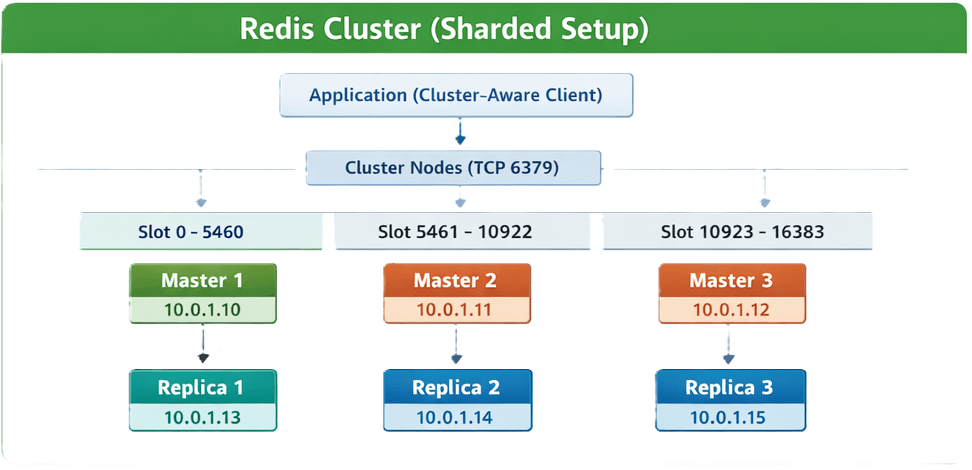
SECTION 4: Installation & 6-Node Setup
1. Installation (Download & Compile)
# Run on all 6 nodes (AL2023 ARM64 example)
sudo dnf update -y && sudo dnf install -y jemalloc-devel openssl-devel systemd-devel wget
wget https://download.redis.io/releases/redis-8.0.0.tar.gz
tar -xzf redis-8.0.0.tar.gz && cd redis-8.0.0
make BUILD_TLS=yes -j$(nproc) && sudo make install
2. Cluster Node Configuration (redis.conf)
# /etc/redis/redis.conf
port 6379
bind 0.0.0.0
cluster-enabled yes
cluster-config-file nodes.conf
cluster-node-timeout 5000
appendonly yes
dir /var/lib/redis
protected-mode no
masterauth "SECURE_CLUSTER_PASS"
requirepass "SECURE_CLUSTER_PASS"
supervised systemd
**Note**: RePEAT across all 6 nodes with their respective internal IPs.
3. Systemd Service (/etc/systemd/system/redis.service)
[Unit]
Description=Redis Cluster Node
After=network.target

[Service]
ExecStart=/usr/local/bin/redis-server /etc/redis/redis.conf
Restart=always
User=redis
LimitNOFILE=65536

[Install]
WantedBy=multi-user.target
4. Cluster Formation CLI
Run this once from any node to form the cluster with 3 Masters and 3 Replicas:
redis-cli --cluster create \
10.0.1.10:6379 10.0.1.11:6379 10.0.1.12:6379 \
10.0.1.13:6379 10.0.1.14:6379 10.0.1.15:6379 \
--cluster-replicas 1 -a "SECURE_CLUSTER_PASS"
5. Performance Check
- Check Topology: `redis-cli -c -a SECURE_CLUSTER_PASS cluster nodes`
- Check Slots: `redis-cli -c -a SECURE_CLUSTER_PASS cluster info`
SECTION 6: Production Considerations
Client Support
Clients must be "Cluster Aware". They need to handle `MOVED` and `ASK` redirections when a key's slot resides on a different node.
No Multi-Key Ops
Operations involving multiple keys (like `SUNION`) only work if all keys belong to the same hash slot. Use **Hash Tags** `{key}` to force this.