

Redis Standalone: The Atomic Foundation
Deep-dive into core internals and production-grade standalone deployment on Amazon Linux 2023.
SECTION 1: Redis Deep Technical Overview
The Event Loop
Despite being single-threaded for command execution, Redis 8.0 uses asynchronous threads for I/O and background tasks (like `UNLINK` and `AOF` rewriting). This ensures that heavy disk operations don't block the main event loop.
Memory Management
Redis relies on **jemalloc** as the default memory allocator on Linux. It's designed to minimize fragmentation and handle high-velocity allocations far better than the standard `libc` allocator.
At its core, Redis is a key-value store where every operation is atomic. This atomicity is guaranteed because commands are executed sequentially in the main thread, eliminating the need for complex locking mechanisms.
SECTION 2: Redis in Modern Architecture
While distributed systems are popular, Standalone Redis remains the backbone for many high-performance use cases:
- Microservice Local Cache: Reducing latency by keeping hot data extremely close to the compute node.
- Session Management: Storing user tokens and transient session data with explicit TTLs.
- Real-time Counters: Atomic increments for rate limiting or analytics counters.
SECTION 3: Installation Architecture
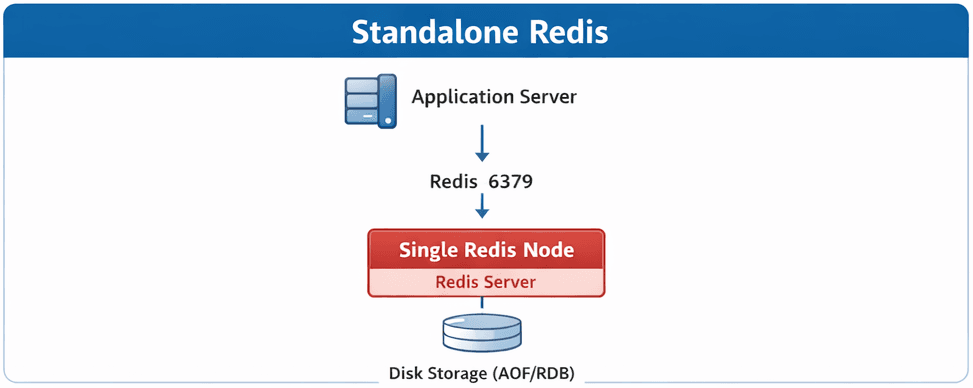
The standalone architecture is straightforward but requires careful CPU/Memory affinity for production workloads.
SECTION 4: Installation (Amazon Linux 2023)
Compiling from source on AL2023 allows us to enable TLS and optimize for ARM64 Graviton instances.
#!/bin/bash
set -euo pipefail

REDIS_VERSION="8.0.0"
REDIS_USER="redis"
REDIS_SRC_DIR="/usr/local/src"
REDIS_CONF_DIR="/etc/redis"
REDIS_DATA_DIR="/var/lib/redis"
REDIS_LOG_DIR="/var/log/redis"
REDIS_SERVICE="/etc/systemd/system/redis.service"

echo "🚀 Installing Redis ${REDIS_VERSION} on Amazon Linux 2023 (ARM64)"

#--------------------------------------------------
# 1. Verify Architecture
#--------------------------------------------------
ARCH=$(uname -m)
if [[ "$ARCH" != "aarch64" ]]; then
  echo "❌ Unsupported architecture: $ARCH"
  exit 1
fi

#--------------------------------------------------
# 2. Install Dependencies
#--------------------------------------------------
echo "📦 Installing dependencies..."
sudo dnf update -y
sudo dnf groupinstall -y "Development Tools"
sudo dnf install -y   gcc   make   jemalloc   jemalloc-devel   openssl-devel   systemd-devel   wget   tar

#--------------------------------------------------
# 3. Download Redis Source
#--------------------------------------------------
echo "⬇️ Downloading Redis ${REDIS_VERSION}..."
cd "$REDIS_SRC_DIR"

if [[ ! -d "redis-${REDIS_VERSION}" ]]; then
  sudo wget https://download.redis.io/releases/redis-${REDIS_VERSION}.tar.gz
  sudo tar -xzf redis-${REDIS_VERSION}.tar.gz
fi

cd redis-${REDIS_VERSION}

#--------------------------------------------------
# 4. Build Redis
#--------------------------------------------------
echo "🔧 Building Redis..."
sudo make BUILD_TLS=yes

#--------------------------------------------------
# 5. Install Redis
#--------------------------------------------------
echo "📥 Installing Redis..."
sudo make install

#--------------------------------------------------
# 6. Create Redis User & Directories
#--------------------------------------------------
echo "👤 Creating Redis user and directories..."
if ! id "$REDIS_USER" &>/dev/null; then
  sudo useradd --system --no-create-home "$REDIS_USER"
fi

sudo mkdir -p "$REDIS_CONF_DIR" "$REDIS_DATA_DIR" "$REDIS_LOG_DIR"
sudo chown "$REDIS_USER:$REDIS_USER" "$REDIS_DATA_DIR" "$REDIS_LOG_DIR"
sudo chmod 770 "$REDIS_DATA_DIR"

#--------------------------------------------------
# 7. Configure Redis
#--------------------------------------------------
echo "⚙️ Configuring Redis..."
if [[ ! -f "$REDIS_CONF_DIR/redis.conf" ]]; then
  sudo cp redis.conf "$REDIS_CONF_DIR/redis.conf"
fi

sudo sed -i   -e 's/^supervised .*/supervised systemd/'   -e 's/^daemonize .*/daemonize no/'   -e 's|^dir .*|dir /var/lib/redis|'   -e 's|^logfile .*|logfile /var/log/redis/redis.log|'   "$REDIS_CONF_DIR/redis.conf"

#--------------------------------------------------
# 8. Create systemd Service
#--------------------------------------------------
echo "🛠 Creating systemd service..."
sudo tee "$REDIS_SERVICE" >/dev/null <<EOF
[Unit]
Description=Redis In-Memory Data Store
After=network.target

[Service]
User=redis
Group=redis
ExecStart=/usr/local/bin/redis-server /etc/redis/redis.conf
ExecStop=/usr/local/bin/redis-cli shutdown
Restart=always
LimitNOFILE=100000

[Install]
WantedBy=multi-user.target
EOF

#--------------------------------------------------
# 9. Enable & Start Redis
#--------------------------------------------------
echo "▶️ Starting Redis..."
sudo systemctl daemon-reexec
sudo systemctl daemon-reload
sudo systemctl enable redis
sudo systemctl restart redis

#--------------------------------------------------
# 10. Validate Installation
#--------------------------------------------------
echo "✅ Validating Redis installation..."
redis-server --version
redis-cli ping

echo "🎉 Redis ${REDIS_VERSION} installed successfully!"
SECTION 6: Production Considerations
1. OS-Level Tuning
Disable Transparent Huge Pages to avoid latency spikes.
sudo bash -c 'echo never > /sys/kernel/mm/transparent_hugepage/enabled'
2. Security (ACLs)
Never run Redis without password. Use Redis 6+ ACLs for granular control.